Actually Doing It #2 – Where Do the Supporting Documents Go?

This is the second post in the “Actually Doing It” series, where I’m documenting what I discover as I work through the vault myself. As soon as I started filling out forms, I ran into a practical question: where do I put the actual supporting documents?

The forms capture summary information. But real life includes PDFs, trust documents, POAs, recovery files, and other records. The folder structure in the book is a starting point — not a rigid system. What follows are a few adjustments I made that reduced friction across multiple chapters.

This article is part of a larger framework explaining the stages of getting your affairs in order. If you’re new to the topic, start with The Stages of Getting Your Affairs in Order.

Organizing Supporting Documents in Your Vault

When you have supporting documents, it makes sense to store them in the same chapter folder as the related forms. If there are only one or two files and they have clear names, that may be enough.

In Chapter 11 – Legal Documents, I wanted my trust documents stored alongside the related forms. But once I added trust documents, POAs, and other files, the folder became cluttered. That’s when I realized structure matters — especially for the person who may need to step in.

Instead of adding explanation, I created a few clearly named subfolders and moved the documents into them. With just a handful of well-named folders, everything became easier to scan and understand.

The goal wasn’t elegance. It was clarity. If someone opens this folder five years from now, it should explain itself.
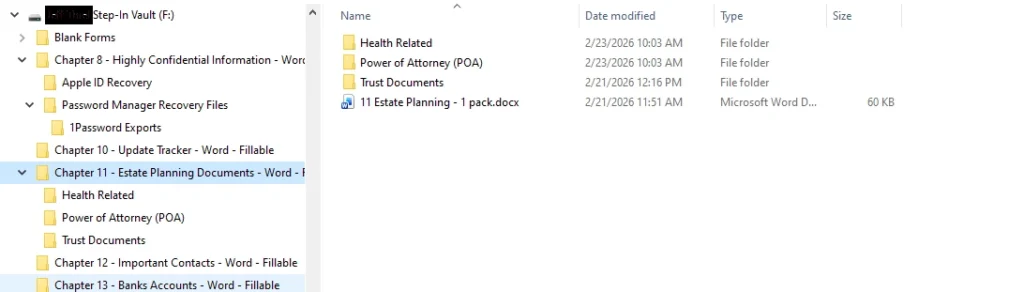
estate planning vault setup

Copying and Renaming Form Files

In Chapter 8 – Confidential Information, I needed to document both my password manager and my safe. Rather than overwrite the original form pack, I copied it and renamed the files to match the subject.

For example, I renamed one file “Password Manager.docx” and another “Safe.docx.” This preserved the original blank forms while making the working files easier to recognize.

Small changes like this reduce confusion later. Clear names matter more than strict adherence to the original file titles.

When to Use ReadMe Files in Your Vault

In some cases, folder names alone weren’t enough. In Chapter 8, I created a subfolder for password manager recovery files. Those files are important, but their purpose isn’t obvious at a glance.

In that situation, I added a simple “ReadMe.docx” file that briefly explains what the files are and where to find instructions for using them.

Whenever possible, I prefer structure over explanation. A clearly named folder often eliminates the need for a ReadMe. But when clarity requires a little context, a short breadcrumb can make a big difference.

Make the Process Work for You

The vault structure and forms provide a framework. They are not meant to lock you into a rigid system. As long as the result improves clarity for your Helper, small adjustments are not only acceptable — they’re helpful.

The real test is simple: if someone opens the folder without you present, will they understand what they’re looking at? If the answer is yes, the structure is doing its job. In some cases, you may also discover that certain documents aren’t there at all — something I ran into later in The Moment You Realize Information Doesn’t Exist.

Leave a Reply

Your email address will not be published. Required fields are marked *