This is the first post in the “Actually Doing It” series where I document what happens when I actually use the process defined in If You Need to Step In to collect and maintain the information needed to get my affairs in order. The book lays out the framework. These posts cover what I discover when I put it to work.
This article is part of a larger framework explaining the stages of getting your affairs in order. If you’re new to the topic, start with The Stages of Getting Your Affairs in Order.
Choosing the Electronic Method
As outlined in Chapter 2 of the book, the first decision is how you want to store your information: paper, hybrid, or all electronic. Before I ever finished writing If You Need to Step In, I knew I would use the all-electronic method for myself. That’s simply how I operate.
My day-to-day life already runs on computers, Microsoft software, cloud storage, and shared digital files. The people I’ve designated as helpers are comfortable in that same environment. For us, securely sharing a digital file is normal. Mailing or hand-delivering binders is not.
I also know myself. I’m not good at paper filing. Papers stack up in my office until I run out of room, and then I deal with them. If I built a paper-based system, I wouldn’t maintain it well. The best system isn’t the most impressive one — it’s the one you’ll realistically keep updated five years from now.
Electronic records are easier to maintain. When something changes, I edit a document and save it. With paper, I’d need to print updated pages, replace them in binders, and possibly redistribute copies. Updates are inevitable. I wanted the update process to be simple.
Finally, I’m more comfortable securing electronic records than managing locked cabinets and physical distribution. I understand passwords, encryption, and backups. That doesn’t mean electronic is safer for everyone — but it’s safer in my hands.
If I were less comfortable with technology, I probably wouldn’t have chosen the all-electronic route unless I had someone guiding me through it. The framework supports paper and hybrid methods for exactly that reason.
Setting Up an Electronic Vault
To set up the vault, I went to the Download Portal on the Online Resources page and downloaded the pre-built vault structure, complete with the Word forms organized by chapter.
I unzipped the vault, copied it into Dropbox, renamed it clearly, and used Cryptomator to change the password and reveal the encrypted drive. These setup steps are demonstrated in the videos on the Online Resource page, so I won’t repeat them here.
Then I made one small adjustment. Inside the vault, I created a folder called “Blank Forms.” I copied all of the chapter folders and their blank forms into that folder. This ensures the original forms are always preserved, even as I modify working versions elsewhere.
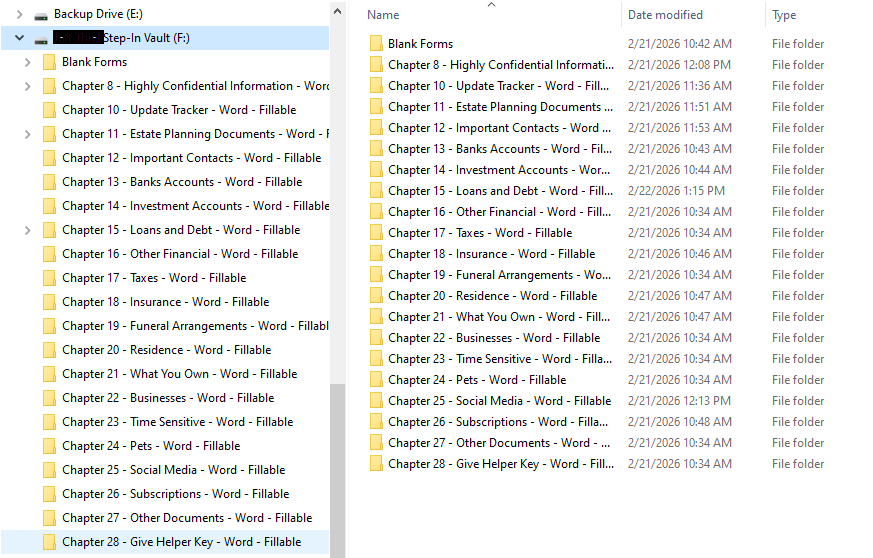
Next, I went through the main chapter folders and deleted forms and form packs I knew I wouldn’t need. Because the originals were preserved in “Blank Forms,” I could simplify the working vault without worrying about losing anything.
At that point, the vault was set up and simplified. I was ready to start filling things out.
A Small but Important Principle
One thing became clear immediately: the goal isn’t to follow every form mechanically. The goal is to capture clear, usable information for the person who may need to step in. As I move forward, I’ll share small adjustments that reduce friction and avoid unnecessary duplication.
If you’re just getting started, don’t over analyze the paper-versus-electronic decision. Choose the method that fits how you already operate and commit to it. Maintainability matters more than elegance. As I move into the actual forms, I’ll document the small changes and shortcuts that made the process more manageable.
